This article about in depth knowledge of how to merge multiple EPF accounts. We all changed our job places and locations many times in our life, right? There are instances when a new company opens another Employee Provident Fund (EPF) account, which leads to multiple accounts. However, it may be noted that with the universal account number (UAN), one can merge multiple accounts into one single account for each EPFO member.
Merge multiple EPF Accounts
Employee Provident Fund Organization (EPFO) offers a facility to merge or consolidate multiple PF accounts with the current UAN to all its members. Here’s a step-by-step process to merge accounts-
- Step 1: Go to EPFO website- https://www.epfindia.gov.in/site_en/For_Employees.php
- Step 2: From the ‘Services’ tab select ‘One Employee-One EPF Account’.
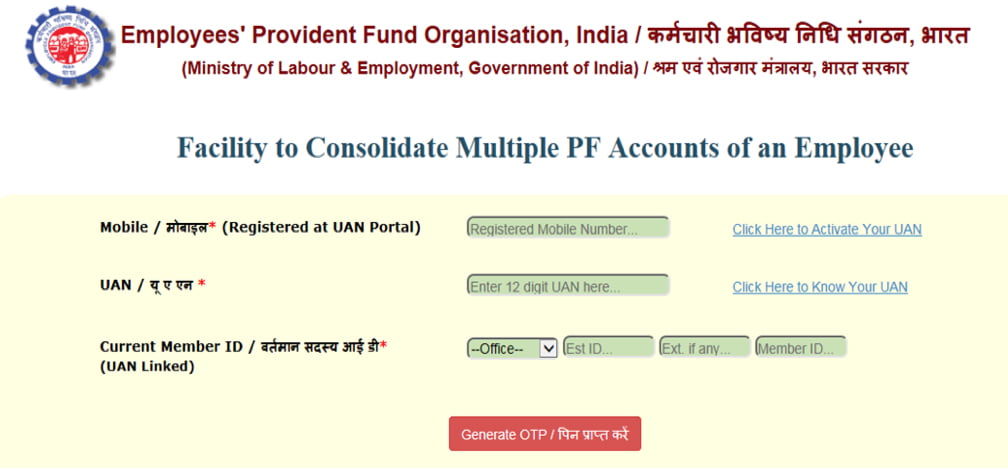
- Step 3: A new page will open for consolidating multiple EPF accounts
- Step 4: Enter your mobile number registered on the UAN portal
- Step 5: Now, enter your UAN and current member ID
- Step 6: After submission, a one-time password (OTP) will be generated for authentication.
- Step 7: Once you enter OTP, the page for entering old PF account details for the merger will be opened
- Step 8: Enter the old PF account number. Accept and submit the declaration
- Step 9: You request for the merger of an old account to the existing PF account will be sent to EPFO
So, if you have activated your UAN, then this facility of merging will be available after three days. Besides that, If you wish to take benefit of this service, you need to have your know your customer (KYC) and Aadhaar details updated and registered with the EPFO.
How to activate your UAN?
If you want to activate your UAN, follow given below process-
Go to Member Interface of the Unified Portal of EPFO. After that click on ‘Activate UAN’ which is given on the right side bottom under ‘important links’.
On the page opened, enter details such as Member ID, PAN, name, date of birth, mobile number, email ID, etc., and given captcha code.
Now you have to click on ‘Get Authorization PIN’. An OTP will be sent to your registered mobile number, click on validate OTP and the process will get completed.
It may be noted that the password to access the UAN member portal will be sent to your mobile. You can use this to log in and can change the password for the UAN account.